Você vai amar este temporizador pomodoro. Feito com ESP32 e conectado à internet, ele é tudo que você precisava e não sabia. Um temporizador com quatro ajustes: 15, 30, 45 ou 60 minutos. Basta pressionar um botão entre uma e quatro vezes para selecionar. O tempo vai contar e um aviso sonoro te avisa quando acabou.
Este temporizador é conectado à internet através do Wi-Fi do ESP32-S2 Franzininho. No seu display de e-paper são mostradas informações como hora e data, condição do tempo, valor do Dólar, inscritos no Youtube e temperatura + humidade. Seu display usa a tecnologia e-paper, o que significa que a última informação impressa na tela permanece (até a próxima atualização). Mesmo que você remova a alimentação.
Como funciona?
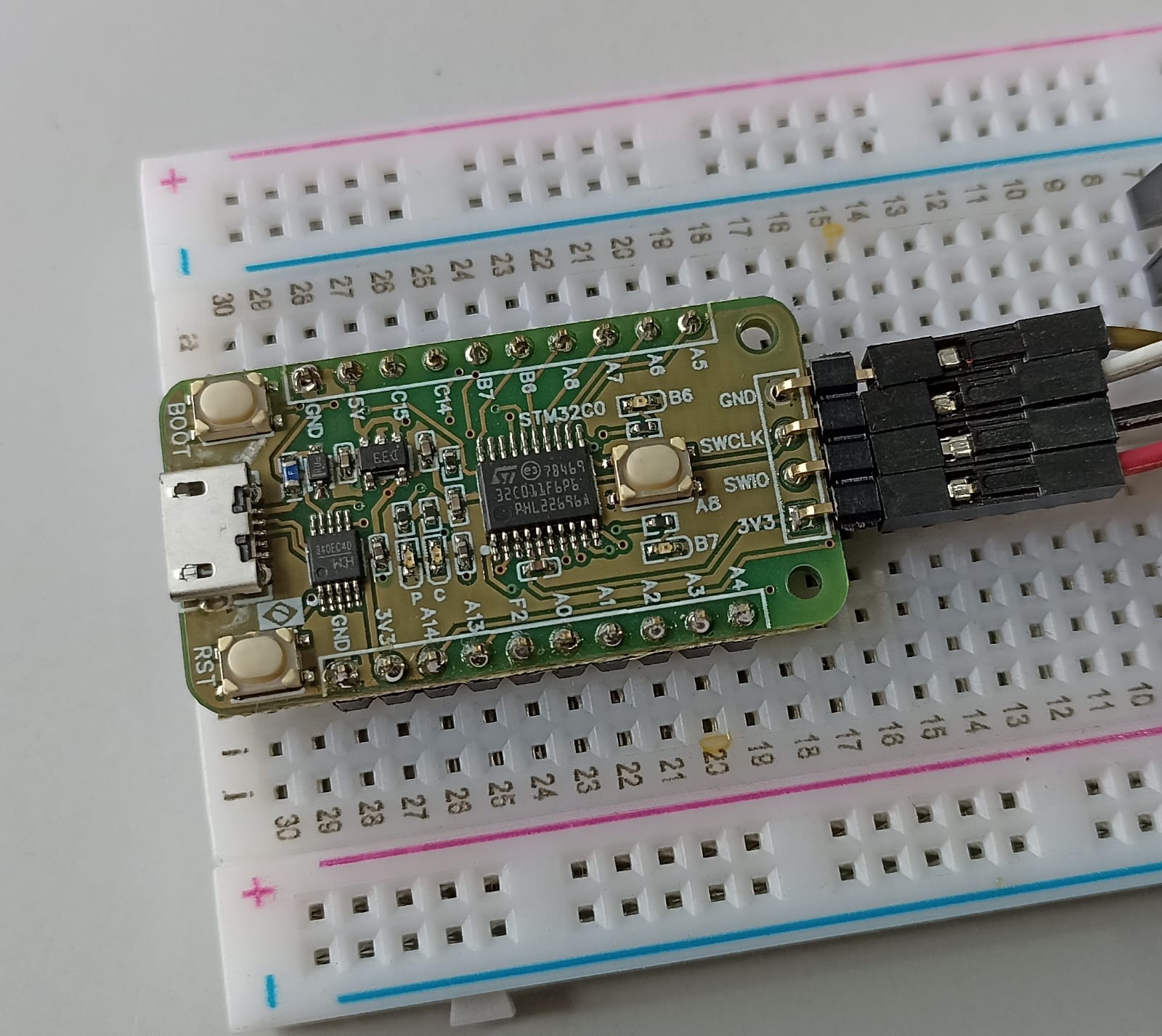
A base do projeto é o microcontrolador ESP32-S2 Franzininho WiFi. O código é todo feito em Arduino na IDE do Arduino versão 2.3.8, porém qualquer versão acima da 1.8 serve. O display é um 2.9 polegadas da WeAct que comprei neste link do Aliexpress. Ele comunica com o ESP32 via protocolo SPI (três pinos) e mais três pinos de controle.
O projeto deste temporizador pomodoro é uma evolução natural deste outro projeto, com o mesmo display, microcontrolador e sensor.
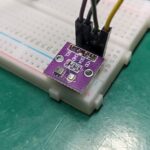
O sensor de temperatura e umidade que utilizei é o SHT21, que comunica via i2c. Já escrevi sobre ele neste artigo um tempo atrás. Além disso há um único botão (push button) para iniciar e parar a contagem de tempo. Há também um auto-falante buzzer 5V para indicar início e fim da contagem de tempo.
Ao pressionar o botão entre uma e quatro vezes, você seleciona o tempo entre 15, 30, 45 e 60 minutos. Logo em seguida este tempo já aparece na tela e inicia-se a contagem regressiva. A tela de e-paper não pode ser atualizada com muita frequência, devido à sua construção interna. Isso significa que tive que pensar muito bem este projeto: a hora (e minutos) é atualizada a cada sessenta segundos. As demais informações (preço do dólar, temperatura, condição do tempo) somente a cada quinze minutos.
Hardware
Conforme mencionado, vamos utilizar o ESP32-S2 Franzininho como microcontrolador principal. Teremos também um SHT21 para medir temperatura e umidade, além de um botão push-button para iniciar e parar a contagem de tempo. Finalmente um auto-falante buzzer para indicação sonora de início/fim de contagem.
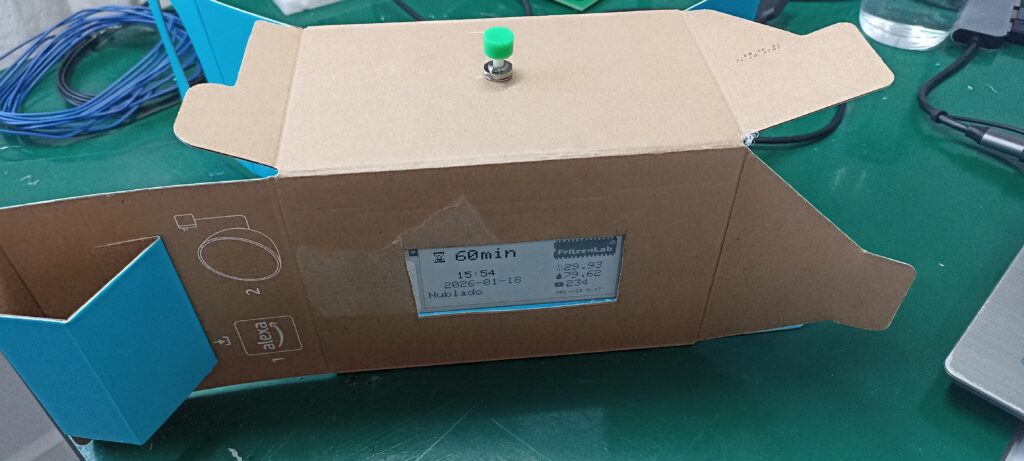
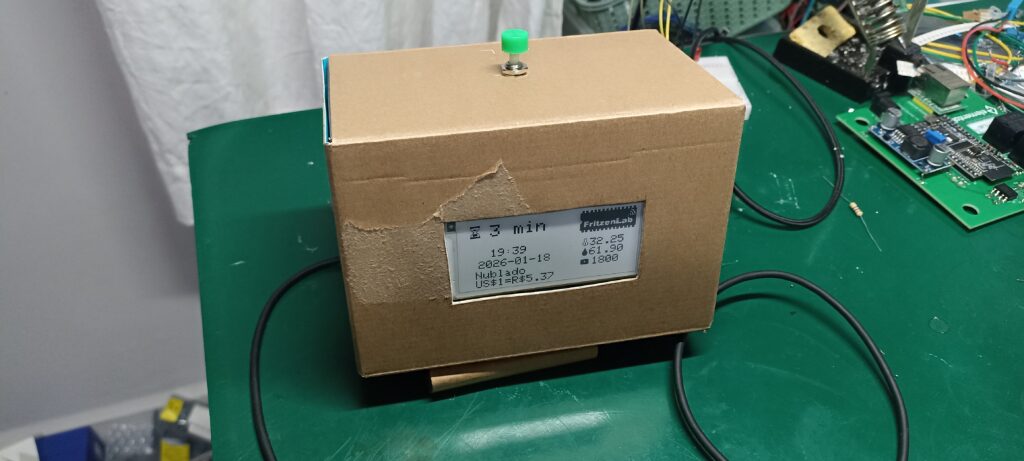
Tudo isto será montado dentro de uma caixa de papelão pequena, conforme fotos abaixo. A alimentação deste temporizador pomodoro será via cabo micro-USB, direto na placa Franzininho. O diagrama esquemático completo está abaixo.

O botão push-button não necessita de resistor de pull-down nem pull-up externo, pois o ESP32-S2 tem internamente. Eu ativo o pull-up deste botão via firmware. O buzzer também não necessita de resistor limitador de corrente, ele já possui todo circuito internamente.
O processo de montagem
A montagem deste protótipo foi bem rápida, eu utilizei cola quente como meio de fixação. A caixa de papelão utilizada foi onde veio minha Alexa Echo Pop, bem pequena. Veja abaixo o display, o botão e o buzzer já colados.
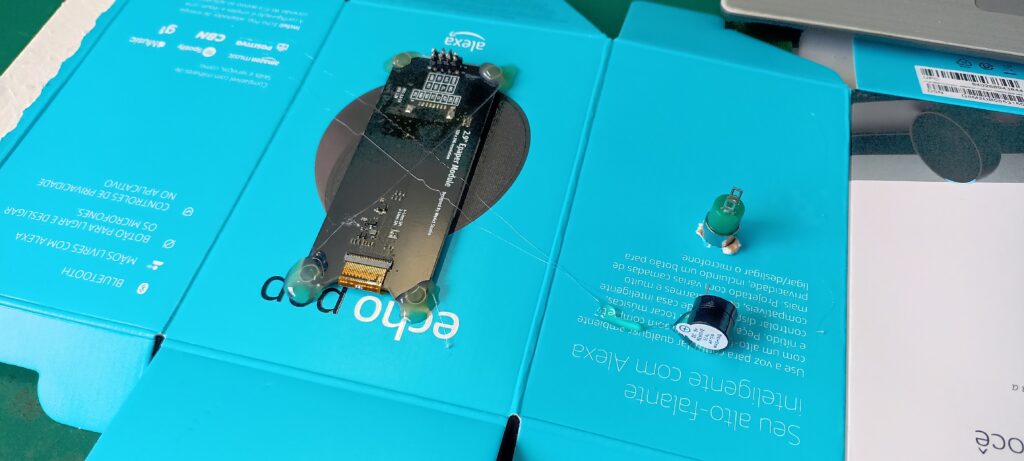
Fiz um rasgo retangular para a tela de e-paper 2,9 polegadas, a qual colei os quatro cantos com cola quente. Fiz um furo redondo para o botão push-button e colei o buzzer com cola quente.
Firmware/código
Todo o código para este temporizador pomodoro é não-bloqueante. Isto significa que eu não usei a função delay() para nada, tudo é feito comparando-se o valor de millis() atual. Isto significa que o código não fica “parado” nem “bloqueado” em lugar nenhum. Quase todas as funcionalidades (ex: obter hora do servidor, obter condição do tempo, ler sensor SHT21) são executadas dentro de funções, deixando o loop() menos poluído.
Nesta versão do código várias constantes ainda estão no próprio sketch do Arduino. Valores como as IDs e tokens do Youtube/Google, OpenWeatherMap, etc. O que pode-se fazer no futuro (fica para você exercitar) é criar um arquivo separado com estas constantes e senhas/segredos. O código está abaixo, completo para ser copiado e colado na IDE do Arduino.
// Youtube code adapted from here:
// https://github.com/BloxyLabs/ESP32_YouTubeCounter/blob/main/ESP32_YT_Counter_V2/ESP32_YT_Counter_V2.ino

/*
Franzininho WiFi (ESP32-S2), WeAct 2.9" e-paper display
D/C 0
CS 1
Busy 2
Res 3
SDA 35
SCL 36
*/

#include <GxEPD2_BW.h>
#include <GxEPD2_GFX.h>

#include <Wire.h>
#include <SHT21.h>
#include <WiFi.h>
#include <WiFiClientSecure.h>
#include <HTTPClient.h>
#include <ArduinoJson.h>
#include <YoutubeApi.h>

SHT21 sht;

// ---------------- PIN DEFINITIONS ----------------
#define EPD_DC    0
#define EPD_CS    1
#define EPD_BUSY  2
#define EPD_RST   3

// ---------------- DISPLAY (WeAct 2.9") ----------------
GxEPD2_BW<GxEPD2_290_T94, GxEPD2_290_T94::HEIGHT> display(
  GxEPD2_290_T94(EPD_CS, EPD_DC, EPD_RST, EPD_BUSY)
);
// Button reading and buzzer
#define button 21
#define buzzer 18
// ---------------- ICONS (unchanged) ----------------
// (all your bitmap arrays stay EXACTLY the same)
// thermometer_icon
// youtube_icon
// humidity_icon
// mylogo
// --------------------------------------------------

// Thermometer Icon (16x16)
const unsigned char thermometer_icon[] PROGMEM = {
  0x03, 0x80, 0x04, 0x40, 0x04, 0x40, 0x04, 0x40, 0x04, 0x40, 0x04, 0x40, 0x04, 0x40, 0x09, 0x20,
  0x11, 0x10, 0x11, 0x10, 0x11, 0x10, 0x11, 0x10, 0x09, 0x20, 0x07, 0xc0, 0x00, 0x00, 0x00, 0x00
};

// YouTube-style Play Icon (16x16)
/*const unsigned char youtube_icon[] PROGMEM = {
  0x7f, 0xfe, 0x80, 0x01, 0x80, 0x01, 0x87, 0x01, 0x87, 0x81, 0x87, 0xc1, 0x87, 0xe1, 0x87, 0xc1,
  0x87, 0x81, 0x87, 0x01, 0x80, 0x01, 0x80, 0x01, 0x7f, 0xfe, 0x00, 0x00, 0x00, 0x00, 0x00, 0x00
};*/


/*const unsigned char youtube_icon [] PROGMEM = {
	0xff, 0xff, 0xff, 0xff, 0xff, 0xff, 0xc0, 0x03, 0x80, 0x01, 0x80, 0x01, 0x81, 0x01, 0x81, 0x81,
	0x81, 0x81, 0x81, 0x01, 0x80, 0x01, 0x80, 0x01, 0xc0, 0x03, 0xff, 0xff, 0xff, 0xff, 0xff, 0xff
};*/

const unsigned char youtube_icon [] PROGMEM = {
	0x00, 0x00, 0x00, 0x00, 0x00, 0x00, 0x3f, 0xfc, 0x7f, 0xfe, 0x7f, 0xfe, 0x7e, 0xfe, 0x7e, 0x7e,
	0x7e, 0x7e, 0x7e, 0xfe, 0x7f, 0xfe, 0x7f, 0xfe, 0x3f, 0xfc, 0x00, 0x00, 0x00, 0x00, 0x00, 0x00
};

// Humidity/Water Droplet Icon (16x16)
const unsigned char humidity_icon[] PROGMEM = {
  0x01, 0x00, 0x01, 0x00, 0x03, 0x80, 0x03, 0x80, 0x07, 0xc0, 0x07, 0xc0, 0x0f, 0xe0, 0x0f, 0xe0,
  0x1f, 0xf0, 0x1f, 0xf0, 0x1f, 0xf0, 0x1f, 0xf0, 0x1f, 0xf0, 0x0f, 0xe0, 0x07, 0xc0, 0x00, 0x00
};

const unsigned char mylogo [] PROGMEM = {
	0x00, 0x00, 0x00, 0x00, 0x00, 0x00, 0x00, 0x00, 0x00, 0x00, 0x00, 0x00, 0x00, 0x00, 0x00, 0x00,
	0x00, 0x00, 0x00, 0x00, 0x00, 0x00, 0x00, 0x00, 0x00, 0x00, 0x07, 0x9e, 0x1e, 0x79, 0xe3, 0xc7,
	0x8e, 0x1c, 0xf1, 0xe3, 0xce, 0x1e, 0x00, 0x07, 0x9e, 0x1e, 0x79, 0xe3, 0xc7, 0x8e, 0x1c, 0xf1,
	0xe3, 0xcf, 0x1e, 0x00, 0x07, 0x9e, 0x1e, 0x79, 0xe3, 0xc7, 0x8e, 0x1c, 0xf1, 0xe3, 0xcf, 0x1e,
	0x00, 0x07, 0x9f, 0x3e, 0x79, 0xe3, 0xcf, 0x9f, 0x3c, 0xf1, 0xe7, 0xcf, 0x1e, 0x00, 0x3f, 0xff,
	0xff, 0xff, 0xff, 0xff, 0xff, 0xff, 0xff, 0xff, 0xff, 0xff, 0x80, 0x3f, 0xff, 0xff, 0xff, 0xff,
	0xff, 0xff, 0xff, 0xff, 0xff, 0xff, 0xff, 0x80, 0x3f, 0xff, 0xff, 0xff, 0xff, 0xff, 0xff, 0xff,
	0xff, 0xff, 0xfe, 0x7f, 0x80, 0x3f, 0xff, 0xff, 0xff, 0xff, 0xff, 0xff, 0xff, 0xff, 0xff, 0xff,
	0x1f, 0x80, 0x3f, 0xff, 0xff, 0xff, 0xff, 0xff, 0xff, 0xff, 0xff, 0xff, 0xff, 0xcf, 0x80, 0x3f,
	0xff, 0xff, 0xff, 0xff, 0xff, 0xff, 0xff, 0xff, 0xff, 0xfd, 0xe7, 0x80, 0x3f, 0xff, 0xff, 0xff,
	0xff, 0xff, 0xff, 0xff, 0xff, 0xff, 0xfc, 0xf3, 0x80, 0x3f, 0xff, 0xff, 0xff, 0xff, 0xff, 0xff,
	0xff, 0xff, 0xff, 0xff, 0x33, 0x80, 0x3f, 0xff, 0xff, 0xff, 0xff, 0xff, 0xff, 0xff, 0xff, 0xff,
	0xff, 0xb9, 0x80, 0x3f, 0xff, 0xff, 0xff, 0xff, 0xff, 0xff, 0xff, 0xff, 0xff, 0xf3, 0x99, 0x80,
	0x3f, 0xff, 0xff, 0xff, 0xff, 0xff, 0xff, 0xff, 0xff, 0xff, 0xfd, 0xdd, 0x80, 0x3f, 0xff, 0xff,
	0xff, 0xff, 0xff, 0xff, 0xff, 0xff, 0xff, 0xfc, 0xcd, 0x80, 0x1f, 0xff, 0xff, 0xff, 0xff, 0xff,
	0xff, 0xff, 0xff, 0xff, 0xee, 0xcd, 0x80, 0x0f, 0xff, 0xff, 0xff, 0xff, 0xff, 0xff, 0xff, 0xff,
	0xff, 0xef, 0xff, 0x80, 0x07, 0xff, 0xff, 0xff, 0xff, 0xff, 0xff, 0xff, 0xff, 0xff, 0xff, 0xff,
	0x80, 0x07, 0xff, 0xff, 0xff, 0xff, 0xff, 0xff, 0xff, 0xff, 0xff, 0xff, 0xff, 0x80, 0x07, 0x80,
	0x7f, 0x8f, 0xff, 0xff, 0xff, 0xfe, 0x1f, 0xff, 0xe7, 0xff, 0x80, 0x07, 0x80, 0x7f, 0x8c, 0x7f,
	0xff, 0xff, 0xfe, 0x1f, 0xff, 0xe7, 0xff, 0x80, 0x0f, 0x8f, 0xff, 0xfc, 0x7f, 0xff, 0xff, 0xfe,
	0x1f, 0xff, 0xe7, 0xff, 0x80, 0x1f, 0x8f, 0xc0, 0x88, 0x30, 0x38, 0x1c, 0x86, 0x1f, 0xc0, 0xe0,
	0x3f, 0x80, 0x3f, 0x80, 0xc0, 0x88, 0x30, 0x10, 0x0c, 0x06, 0x1f, 0x80, 0x60, 0x3f, 0x80, 0x3f,
	0x80, 0xc3, 0x8c, 0x7c, 0x31, 0x8c, 0x42, 0x1f, 0xfc, 0x63, 0x1f, 0x80, 0x3f, 0x8f, 0xc7, 0x8c,
	0x78, 0x70, 0x0c, 0x62, 0x1f, 0xc0, 0x63, 0x1f, 0x80, 0x3f, 0x8f, 0xc7, 0x8c, 0x70, 0xf1, 0xfc,
	0xe2, 0x1f, 0x8c, 0x63, 0x1f, 0x80, 0x3f, 0x8f, 0xc7, 0x8c, 0x60, 0xf1, 0x9c, 0xe2, 0x00, 0x8c,
	0x62, 0x1f, 0x80, 0x3f, 0x8f, 0xc7, 0x8c, 0x00, 0x18, 0x1c, 0xe2, 0x00, 0x80, 0x60, 0x3f, 0x80,
	0x3f, 0xff, 0xff, 0xff, 0x3f, 0xfe, 0x7f, 0xff, 0xff, 0xcf, 0xfe, 0x7f, 0x80, 0x3f, 0xff, 0xff,
	0xff, 0xff, 0xff, 0xff, 0xff, 0xff, 0xff, 0xff, 0xff, 0x80, 0x3f, 0xff, 0xff, 0xff, 0xff, 0xff,
	0xff, 0xff, 0xff, 0xff, 0xff, 0xff, 0x80, 0x3f, 0xff, 0xff, 0xff, 0xff, 0xff, 0xff, 0xff, 0xff,
	0xff, 0xff, 0xff, 0x80, 0x3f, 0xff, 0xff, 0xff, 0xff, 0xff, 0xff, 0xff, 0xff, 0xff, 0xff, 0xff,
	0x80, 0x3f, 0xff, 0xff, 0xff, 0xff, 0xff, 0xff, 0xff, 0xff, 0xff, 0xff, 0xff, 0x80, 0x0f, 0x9f,
	0x3e, 0xf9, 0xf7, 0xef, 0x9f, 0x7c, 0xfb, 0xf7, 0xcf, 0xbf, 0x00, 0x07, 0x9e, 0x1e, 0x79, 0xe3,
	0xc7, 0x8e, 0x1c, 0xf1, 0xe3, 0xcf, 0x1e, 0x00, 0x07, 0x9e, 0x1e, 0x79, 0xe3, 0xc7, 0x8e, 0x1c,
	0xf1, 0xe3, 0xcf, 0x1e, 0x00, 0x07, 0x9e, 0x1e, 0x79, 0xe3, 0xc7, 0x8e, 0x1c, 0xf1, 0xe3, 0xcf,
	0x1e, 0x00, 0x00, 0x00, 0x00, 0x00, 0x00, 0x00, 0x00, 0x00, 0x00, 0x00, 0x00, 0x00, 0x00, 0x00,
	0x00, 0x00, 0x00, 0x00, 0x00, 0x00, 0x00, 0x00, 0x00, 0x00, 0x00, 0x00, 0x00, 0x00, 0x00, 0x00,
	0x00, 0x00, 0x00, 0x00, 0x00, 0x00, 0x00, 0x00, 0x00
};

/*const unsigned char mylogo[] PROGMEM = {
	0xff, 0xff, 0xff, 0xff, 0xff, 0xff, 0xff, 0xff, 0xff, 0xff, 0xff, 0xff, 0xf0, 0xf0, 0x60, 0xc1,
	0x06, 0x0c, 0x30, 0x60, 0x83, 0x06, 0x18, 0x30, 0x41, 0xf0, 0xf0, 0x70, 0xc1, 0x06, 0x0c, 0x38,
	0x60, 0x83, 0x0e, 0x1c, 0x30, 0x41, 0xf0, 0xf0, 0x70, 0xc1, 0x06, 0x0c, 0x38, 0x60, 0x83, 0x0e,
	0x1c, 0x30, 0x41, 0xf0, 0xf0, 0x70, 0xc1, 0x06, 0x0c, 0x38, 0x60, 0x83, 0x0e, 0x1c, 0x30, 0x41,
	0xf0, 0xf0, 0x70, 0xc1, 0x06, 0x0c, 0x38, 0x60, 0x83, 0x0e, 0x1c, 0x30, 0x41, 0xf0, 0xc0, 0x00,
	0x00, 0x00, 0x00, 0x00, 0x00, 0x00, 0x00, 0x00, 0x00, 0x00, 0x70, 0xc0, 0x00, 0x00, 0x00, 0x00,
	0x00, 0x00, 0x00, 0x00, 0x00, 0x00, 0x00, 0x70, 0xc0, 0x00, 0x00, 0x00, 0x00, 0x00, 0x00, 0x00,
	0x00, 0x00, 0x01, 0x80, 0x70, 0xc0, 0x00, 0x00, 0x00, 0x00, 0x00, 0x00, 0x00, 0x00, 0x00, 0x01,
	0xe0, 0x70, 0xc0, 0x00, 0x00, 0x00, 0x00, 0x00, 0x00, 0x00, 0x00, 0x00, 0x00, 0x70, 0x70, 0xc0,
	0x00, 0x00, 0x00, 0x00, 0x00, 0x00, 0x00, 0x00, 0x00, 0x02, 0x18, 0x70, 0xc0, 0x00, 0x00, 0x00,
	0x00, 0x00, 0x00, 0x00, 0x00, 0x00, 0x07, 0x8c, 0x70, 0xc0, 0x00, 0x00, 0x00, 0x00, 0x00, 0x00,
	0x00, 0x00, 0x00, 0x00, 0xcc, 0x70, 0xc0, 0x00, 0x00, 0x00, 0x00, 0x00, 0x00, 0x00, 0x00, 0x00,
	0x08, 0x46, 0x70, 0xc0, 0x00, 0x00, 0x00, 0x00, 0x00, 0x00, 0x00, 0x00, 0x00, 0x0e, 0x66, 0x70,
	0xc0, 0x00, 0x00, 0x00, 0x00, 0x00, 0x00, 0x00, 0x00, 0x00, 0x06, 0x26, 0x70, 0xc0, 0x00, 0x00,
	0x00, 0x00, 0x00, 0x00, 0x00, 0x00, 0x00, 0x03, 0x32, 0x70, 0xc0, 0x00, 0x00, 0x00, 0x00, 0x00,
	0x00, 0x00, 0x00, 0x00, 0x33, 0x32, 0x70, 0xf0, 0x00, 0x00, 0x00, 0x00, 0x00, 0x00, 0x00, 0x00,
	0x00, 0x10, 0x00, 0x70, 0xf8, 0x3f, 0x01, 0x80, 0x00, 0x00, 0x00, 0x08, 0x00, 0x06, 0x00, 0x00,
	0x70, 0xf8, 0x3f, 0x01, 0x88, 0x00, 0x00, 0x00, 0x08, 0x00, 0x06, 0x00, 0x00, 0x70, 0xf8, 0x20,
	0x00, 0x08, 0x00, 0x00, 0x00, 0x08, 0x00, 0x06, 0x00, 0x00, 0x70, 0xf8, 0x20, 0x5d, 0x9f, 0x7e,
	0x3e, 0x3f, 0x08, 0x07, 0xc7, 0xe0, 0x00, 0x70, 0xf0, 0x20, 0x61, 0x88, 0x06, 0x63, 0x39, 0x88,
	0x08, 0x47, 0x30, 0x00, 0x70, 0xe0, 0x3e, 0x61, 0x88, 0x04, 0x41, 0x30, 0x88, 0x00, 0x66, 0x10,
	0x00, 0x70, 0xc0, 0x20, 0x41, 0x88, 0x08, 0x7f, 0x30, 0x88, 0x07, 0xe6, 0x18, 0x00, 0x70, 0xc0,
	0x20, 0x41, 0x88, 0x10, 0x40, 0x30, 0x88, 0x0c, 0x66, 0x18, 0x00, 0x70, 0xc0, 0x20, 0x41, 0x88,
	0x30, 0x40, 0x30, 0x88, 0x08, 0x66, 0x18, 0x00, 0x70, 0xc0, 0x20, 0x41, 0x88, 0x60, 0x60, 0x30,
	0x88, 0x08, 0x66, 0x10, 0x00, 0x70, 0xc0, 0x20, 0x41, 0x8f, 0x7e, 0x3f, 0x30, 0x8f, 0xef, 0xe7,
	0xf0, 0x00, 0x70, 0xc0, 0x00, 0x00, 0x00, 0x00, 0x00, 0x00, 0x00, 0x00, 0x00, 0x00, 0x00, 0x70,
	0xc0, 0x00, 0x00, 0x00, 0x00, 0x00, 0x00, 0x00, 0x00, 0x00, 0x00, 0x00, 0x70, 0xc0, 0x00, 0x00,
	0x00, 0x00, 0x00, 0x00, 0x00, 0x00, 0x00, 0x00, 0x00, 0x70, 0xc0, 0x00, 0x00, 0x00, 0x00, 0x00,
	0x00, 0x00, 0x00, 0x00, 0x00, 0x00, 0x70, 0xc0, 0x00, 0x00, 0x00, 0x00, 0x00, 0x00, 0x00, 0x00,
	0x00, 0x00, 0x00, 0x70, 0xc0, 0x00, 0x00, 0x00, 0x00, 0x00, 0x00, 0x00, 0x00, 0x00, 0x00, 0x00,
	0x70, 0xc0, 0x00, 0x00, 0x00, 0x00, 0x00, 0x00, 0x00, 0x00, 0x00, 0x00, 0x00, 0x70, 0xf0, 0x70,
	0xc1, 0x06, 0x08, 0x38, 0x60, 0x83, 0x0e, 0x1c, 0x30, 0x41, 0xf0, 0xf0, 0x70, 0xc1, 0x06, 0x0c,
	0x38, 0x60, 0x83, 0x0e, 0x1c, 0x30, 0x41, 0xf0, 0xf0, 0x70, 0xc1, 0x06, 0x0c, 0x38, 0x60, 0x83,
	0x0e, 0x1c, 0x30, 0x41, 0xf0, 0xf0, 0x70, 0xc1, 0x06, 0x0c, 0x38, 0x60, 0x83, 0x0e, 0x1c, 0x30,
	0x41, 0xf0, 0xf0, 0x60, 0xc1, 0x06, 0x0c, 0x30, 0x60, 0x83, 0x06, 0x18, 0x30, 0x41, 0xf0, 0xff,
	0xff, 0xff, 0xff, 0xff, 0xff, 0xff, 0xff, 0xff, 0xff, 0xff, 0xff, 0xf0, 0xff, 0xff, 0xff, 0xff,
	0xff, 0xff, 0xff, 0xff, 0xff, 0xff, 0xff, 0xff, 0xf0
};*/

const unsigned char hourglass [] PROGMEM = {
	0x00, 0x00, 0x00, 0x00, 0x00, 0x00, 0x00, 0x00, 0x00, 0x00, 0x00, 0x00, 0x00, 0x00, 0x00, 0x00,
	0x00, 0xff, 0xff, 0x00, 0x00, 0xff, 0xff, 0x00, 0x00, 0xff, 0xff, 0x00, 0x00, 0x40, 0x02, 0x00,
	0x00, 0x40, 0x02, 0x00, 0x00, 0x40, 0x02, 0x00, 0x00, 0x4f, 0xc2, 0x00, 0x00, 0x23, 0xc4, 0x00,
	0x00, 0x18, 0x18, 0x00, 0x00, 0x0c, 0x30, 0x00, 0x00, 0x04, 0x20, 0x00, 0x00, 0x04, 0x20, 0x00,
	0x00, 0x0c, 0x30, 0x00, 0x00, 0x18, 0x18, 0x00, 0x00, 0x27, 0xe4, 0x00, 0x00, 0x4f, 0xf2, 0x00,
	0x00, 0x4f, 0xf2, 0x00, 0x00, 0x4f, 0xf2, 0x00, 0x00, 0x40, 0x02, 0x00, 0x00, 0xff, 0xff, 0x00,
	0x00, 0xff, 0xff, 0x00, 0x00, 0xff, 0xff, 0x00, 0x00, 0x00, 0x00, 0x00, 0x00, 0x00, 0x00, 0x00,
	0x00, 0x00, 0x00, 0x00, 0x00, 0x00, 0x00, 0x00, 0x00, 0x00, 0x00, 0x00, 0x00, 0x00, 0x00, 0x00
};

const unsigned char stop [] PROGMEM = {
	0x00, 0x00, 0x00, 0x00, 0x00, 0x00, 0x00, 0x00, 0x00, 0x00, 0x00, 0x00, 0x00, 0x00, 0x00, 0x00,
	0x00, 0x07, 0xf0, 0x00, 0x00, 0x3f, 0xfc, 0x00, 0x00, 0x70, 0x0e, 0x00, 0x00, 0xc0, 0x03, 0x00,
	0x01, 0x80, 0x01, 0x80, 0x03, 0x00, 0x00, 0xc0, 0x06, 0x00, 0x00, 0x60, 0x06, 0x1f, 0xf8, 0x60,
	0x04, 0x1f, 0xf8, 0x20, 0x0c, 0x1f, 0xf8, 0x30, 0x0c, 0x1f, 0xf8, 0x30, 0x0c, 0x1f, 0xf8, 0x30,
	0x0c, 0x1f, 0xf8, 0x30, 0x0c, 0x1f, 0xf8, 0x30, 0x0c, 0x1f, 0xf8, 0x30, 0x04, 0x1f, 0xf8, 0x20,
	0x06, 0x1f, 0xf8, 0x60, 0x06, 0x00, 0x00, 0x60, 0x03, 0x00, 0x00, 0xc0, 0x01, 0x80, 0x01, 0x80,
	0x00, 0xc0, 0x03, 0x80, 0x00, 0x70, 0x0e, 0x00, 0x00, 0x3f, 0xfc, 0x00, 0x00, 0x0f, 0xf0, 0x00,
	0x00, 0x00, 0x00, 0x00, 0x00, 0x00, 0x00, 0x00, 0x00, 0x00, 0x00, 0x00, 0x00, 0x00, 0x00, 0x00
};
// WiFi
const char* ssid = "";
const char* password = "";

// YouTube
const char* apiKey = "";
const char* channelIdBR = "";

long subscribers = 0;
long updateALL = 0;
bool startup = true;

float temp;
float humidity;
const char* weatherapikey= ""; // from OpenWeatherMap
const char* weatherlanguage= ""; // OpenWeatherMap
String weathercondition;
String currentDate;
int currentHour;
int currentMinute;
long partialUpdate= 0;
double conversion = 0;
bool partialRefreshControl = false;
bool codeInitializing= true;
bool statuscontrol= true;
long buttonTime= 0;
bool buttonState= true;
bool oldButtonState= false;
bool commandPomodoro= false;
int countButton= 0;
bool ringToneON= false; // controls the buzzer
bool stopBuzzer= false;
long stopBuzzerTimer= 0;
bool stopControllingBuzzer= true;
const unsigned long PRESS_WINDOW_MS = 4000;
bool pomodoroActive = false;        // Are we counting presses?
unsigned long pomodoroStartTime = 0;
uint8_t pressCount = 0;
bool lastReading = true;        // raw input
int settime = 0;                    // result in minutes
bool startedCounting= false;
const unsigned long DEBOUNCE_MS = 50;
unsigned long lastDebounceTime = 0;
const unsigned long LONG_PRESS_MS = 3000;
bool longPressActive = false;
unsigned long pressStartTime = 0;
unsigned long now= 0;
bool lastButtonState;
// --------------------------------------------------

void setup() {
  Serial.begin(115200);
  Wire.begin();
  pinMode(button, INPUT_PULLUP);
  pinMode(buzzer, OUTPUT);
  // -------- DISPLAY INIT (GxEPD2) --------
  display.init(115200);
  display.setRotation(-1);
  display.setFullWindow();

  // One guaranteed clean refresh (fixes stripe forever)
  /*display.firstPage();
  do {
    display.fillScreen(GxEPD_WHITE);
  } while (display.nextPage());*/

  delay(2000);
  // --------------------------------------

  WiFi.disconnect();
  WiFi.mode(WIFI_STA);
  Serial.println("[SETUP] Tentando conexão com o WiFi...");
  WiFi.begin(ssid, password);

  if (WiFi.waitForConnectResult() != WL_CONNECTED) {
    Serial.println("[SETUP] Falha no WiFi. Reiniciando.");
    ESP.restart();
  }

  Serial.println("[SETUP] WiFi conectado!");
  getTime();
}

void loop() {

  startPomodoro(); // button reading
  checkLongPressCancel(now);    // long-press (3s) cancel logic

  if(stopBuzzer == true){
    stopBuzzerTimer= millis();
    stopBuzzer= false;
  }else if((millis() - stopBuzzerTimer > 500) && stopBuzzer == false && stopControllingBuzzer == false){
    digitalWrite(buzzer, LOW);
    stopControllingBuzzer= true;
  }

  if ((millis() - partialUpdate > 60000) || partialRefreshControl == true) {
    partialUpdate = millis();
    partialRefreshControl= false;
    getTime();
    if(settime > 0){
      settime --;
      statuscontrol= true;
      if(settime == 1){ // prepare to ring the tone
        ringToneON= true;
      }
    }else{
      settime= 0;
      statuscontrol= false;
      if(ringToneON == true){
        ringTone(); // turn a buzzer on at the end of the counting
        ringToneON= false;
      }

    }

    display.setPartialWindow(5, 3, 170, 65);

    display.firstPage();
    do {
      // Clear ONLY the partial area
      display.fillRect(
        5,
        3,
        170,
        65,
        GxEPD_WHITE
      );
      // This piece of code runs every minute and decides what is shown in the timer part of the code
      if(statuscontrol == true){
        //statuscontrol= false;
        display.setTextSize(3);
        display.setCursor(50, 10);
        display.print(settime);
        display.setCursor(70, 10);
        display.println(" min");
        display.drawBitmap(10, 5, hourglass, 32, 32, GxEPD_BLACK);
      }else{
        display.setTextSize(3);
        display.setCursor(50, 10);
        //display.setCursor(70, 10);
        display.println("Stopped");
        display.drawBitmap(10, 5, stop, 32, 32, GxEPD_BLACK);
      }


      display.setCursor(50, 55);
      display.setTextSize(2);
      display.print(currentHour);
      display.print(":");
      if (currentMinute < 10) display.print("0");  // add leading zero, so that it shows 21:03 instead of 21:3
      display.print(currentMinute);

      display.setTextSize(3);

    } while (display.nextPage());

    codeInitializing= true;
  }

  if ((millis() - updateALL > 900000) || startup || startedCounting == true) { // updates everything every 15 minutes
    updateALL = millis();
    startup = false;
    startedCounting= false;
    currency();

    // -------- Sensors --------
    temp = sht.getTemperature();
    humidity = sht.getHumidity();

    // -------- YouTube --------
    getSubscribersNet();

    //------- Weather -------
    getWeather();

    // -------- DISPLAY UPDATE --------
    display.setFullWindow();
    display.firstPage();
    do {
      display.fillScreen(GxEPD_WHITE);
      display.setTextColor(GxEPD_BLACK);


      display.drawBitmap(display.width() - 101, 1, mylogo, 100, 45, GxEPD_BLACK);
      display.drawBitmap(200, 55, thermometer_icon, 16, 16, GxEPD_BLACK);
      display.drawBitmap(200, 73, humidity_icon, 16, 16, GxEPD_BLACK);
      display.drawBitmap(200, 92, youtube_icon, 16, 16, GxEPD_BLACK);


      //display.drawFastVLine(display.width() - 102, 0, display.height(), GxEPD_BLACK);
      //display.drawFastHLine(0, 45, display.width() - 102, GxEPD_BLACK);
      display.setTextSize(2);
      display.setCursor(215, 55);
      display.print(temp);
      display.setCursor(215, 73);
      display.print(humidity);
      display.setCursor(205, 115);
      //display.setTextSize(1);
      display.setCursor(220, 92);
      display.setTextSize(2);
      display.println(subscribers);
      display.setCursor(30, 75);
      //display.setTextSize(2);
      display.println(currentDate);

      display.setCursor(25, 95);
      display.println(weathercondition);
      display.setCursor(25, 112);
      display.print("US$1=R$"); display.println(conversion, 2);

    } while (display.nextPage());

    if(codeInitializing == true){
      partialRefreshControl = true;
      codeInitializing= false;
    }

  }

}

// --------------------------------------------------

void getSubscribersNet() {
  WiFiClientSecure client;
  client.setInsecure();

  HTTPClient http;
  String url = "https://www.googleapis.com/youtube/v3/channels?part=statistics&id="
               + String(channelIdBR) + "&key=" + String(apiKey);

  if (http.begin(client, url)) {
    int httpCode = http.GET();

    if (httpCode == 200) {
      DynamicJsonDocument doc(2048);
      deserializeJson(doc, http.getString());
      const char* countStr = doc["items"][0]["statistics"]["subscriberCount"];
      subscribers = atol(countStr);
    }
    http.end();
  }
}
void getWeather() {
  WiFiClientSecure client;
  client.setInsecure();

  HTTPClient http;
  String url = "https://api.openweathermap.org/data/2.5/weather?lat=YourLatitude&lon=YourLongitude&appid="
               + String(weatherapikey) + "&lang=" + String(weatherlanguage);

  if (http.begin(client, url)) {
    int httpCode = http.GET();

    if (httpCode == 200) {
      DynamicJsonDocument doc(2048);
      deserializeJson(doc, http.getString());
      weathercondition = doc["weather"][0]["description"].as<String>();
      weathercondition.setCharAt(0, toupper(weathercondition.charAt(0)));
    }
    http.end();
  }
}
void getTime() {
  WiFiClientSecure client;
  client.setInsecure();   // OK for testing

  HTTPClient http;

  String url = "https://api.timezonedb.com/v2.1/get-time-zone?key=TimeZoneDBKey&format=json&by=zone&zone=YourLocation";

  if (http.begin(client, url)) {
    int httpCode = http.GET();

    if (httpCode == 200) {
      DynamicJsonDocument doc(2048);
      DeserializationError err = deserializeJson(doc, http.getString());

      if (!err) {
        String datetime = doc["formatted"].as<String>();

        currentDate   = datetime.substring(0, 10);
        currentHour   = datetime.substring(11, 13).toInt();
        currentMinute = datetime.substring(14, 16).toInt();
      }
    }

    http.end();
  }
}
void currency(){
  HTTPClient http;
  http.begin("https://api.freecurrencyapi.com/v1/latest?apikey=FreeCurrencyAPIkey");
  int httpCode = http.GET();

  if (httpCode == HTTP_CODE_OK) {
    DynamicJsonDocument doc(2048);
    deserializeJson(doc, http.getString());
    conversion = doc["data"]["BRL"].as<double>();
  }
  http.end();
}
void startPomodoro() {
  now = millis();

    bool reading = digitalRead(button);

  // If input changed, reset debounce timer
  if (reading != lastReading) {
    lastDebounceTime = now;
  }

  // If stable long enough, accept it
  if ((now - lastDebounceTime) > DEBOUNCE_MS) {

    // Detect FALLING edge (HIGH → LOW)
    if (buttonState == HIGH && reading == LOW) {

      if (!pomodoroActive) {
        pomodoroActive = true;
        pomodoroStartTime = now;
        pressCount = 0;
      }

      pressCount++;
      Serial.print("Press count: ");
      Serial.println(pressCount);
    }

    buttonState = reading;  // update stable state
  }

  lastReading = reading;     // always track raw input


  // ---- If window expired, evaluate presses ----
  if (pomodoroActive && (now - pomodoroStartTime >= PRESS_WINDOW_MS)) {

    switch (pressCount) {

      case 1: settime = 15; break;
      case 2: settime = 30; break;
      case 3: settime = 45; break;
      case 4: settime = 60; break;
      default: settime = 0;  // invalid or too many presses
    }
    statuscontrol= true; // enables the counting down process to happen
    startedCounting= true;
    ringTone();
    Serial.print("Pomodoro set to: ");
    Serial.print(settime);
    Serial.println(" minutes");

    // Reset state
    pomodoroActive = false;
    pressCount = 0;
  }
}
void ringTone(){
  digitalWrite(buzzer, HIGH);
  stopBuzzer= true;
  stopControllingBuzzer= false;
}
void checkLongPressCancel(unsigned long now) {

  bool reading = digitalRead(button);

  // Button just pressed
  if (reading == LOW && lastButtonState == HIGH) {
    pressStartTime = now;
    longPressActive = true;
  }

  // Button released
  if (reading == HIGH && lastButtonState == LOW) {
    longPressActive = false;
  }

  // Button held long enough
  if (longPressActive && (now - pressStartTime >= LONG_PRESS_MS)) {

    // ---- CANCEL POMODORO ----
    pomodoroActive = false;
    pressCount = 0;

    Serial.println("Pomodoro cancelled (long press)");

    longPressActive = false;   // prevent retrigger
    startup= true;
    settime= 0;
    ringToneON= true;
    partialRefreshControl= true;
  }

  lastButtonState = reading;
}
These two functions at the beginning of the loop are responsible for reading the button. Both for start and stop of the pomodoro timer:
startPomodoro(); // button reading
checkLongPressCancel(now);    // long-press (3s) cancel logic
I have got four more functions to handle everything else in the code. I separated them from the main() loop to keep things more organized and readable.
void currency()
void getTime()
void getWeather()
void getSubscribersNet()
Conforme mecionado acima, você precisa colar no código suas credenciais do Youtube/Google, “OpenWeatherMap” e “Free currency API”. Estes valores são seus e apenas seus, não os compartilhe na internet.
As imagens exibidas no display (do botão de stop, da ampulheta e do logo Fritzenlab) foram convertidas usando este serviço. Para isto eu escolhi imagens monocromáticas (preto e branco) da internet. Os símbolos de temperatura e umidade, bem como o símbolo do Youtube são 16×16 pixels. A ampulheta e o sinal de parada são 32×32 pixels. A logomarca do FritzenLab é 100×45 pixels.
Resultado final
Copie o código acima e cole-o na sua IDE do Arduino. Então clique em “Upload” (setinha para a direita no canto superior esquerdo da tela). Isto tem que ser feito com seu ESP32 já conectado ao computador via cabo USB.
A tela exibida será similar aquela da image abaixo, com a palavra “Stopped”. Isto significa que o temporizador pomodoro ainda não foi acionado. Para isto, basta pressionar o botão verde entre uma e quatro vezes.
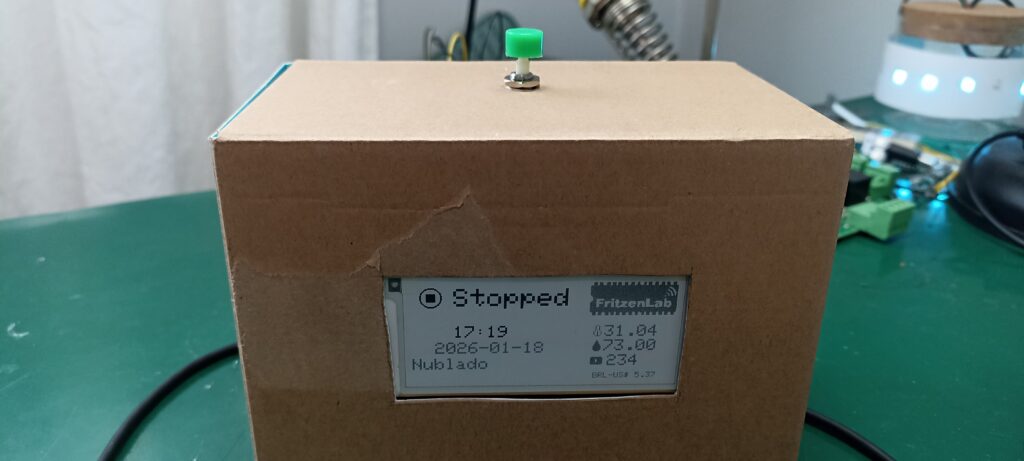
Após isso um bip sonoro será ouvido, iniciando a contagem de tempo. A cada 60 segundos o número de minutos será descontado de um em um. O vídeo com o funcionamento do protótipo está no início desta postagem, suba lá para acompanhar.
Caso tenha dúvidas, comente na caixa de comentários abaixo ou então lá no Youtube do FritzenLab. Até o próximo artigo.

Pingback: A Simple Desktop Pomodoro Timer – WordUp News
Pingback: You too can build this cool DIY ESP32 Pomodoro timer - yojanasewa.com
Pingback: A Simple Desktop Pomodoro Timer – The Latest News!
Pingback: A Simple Desktop Pomodoro Timer - سرخط سایتهای خبری و تحلیلی